
Run a Conversion Report
A Conversion Report points a small named panel of synthetic shoppers at one page and finds where the funnel leaks. There is no second version, no winner, and no verdict. Use it when you want to know where shoppers drop off before you decide what to change.
Before you start
A report renders only if Squoosh finds a multi-step funnel on the page. Point it at a page that leads somewhere — a product page that flows into add-to-cart and checkout, for example — not a static landing page.
Your synthetic shoppers must be calibrated before you can launch. If they aren't, the wizard blocks the launch with Calibrate synthetic shoppers first. See Calibrate synthetic shoppers to set them up.
Run a report
- In the sidebar, click Conversion Reports.
- Click New conversion report.
- Enter the Target URL — the page you want to diagnose. Squoosh crawls this page to map the funnel it finds — product, add-to-cart, checkout, confirmation — then sends your panel through it.
- Under Personas, pick the panel size and who is in it. Choose Standard (10 shoppers) or Deep (30 shoppers), then toggle which shopping styles take part — six are available: Budget hunter, Deep researcher, Impulse buyer, Brand loyalist, Skeptic, Gift buyer. Squoosh spreads whichever panel size you picked across the styles you toggled. The wizard shows the credit cost and estimated run time for that size.
- Under Shopper tasks, review the objectives Squoosh drafted from your page. Edit or remove any task. You can launch once at least one remains.
- Click Launch report.
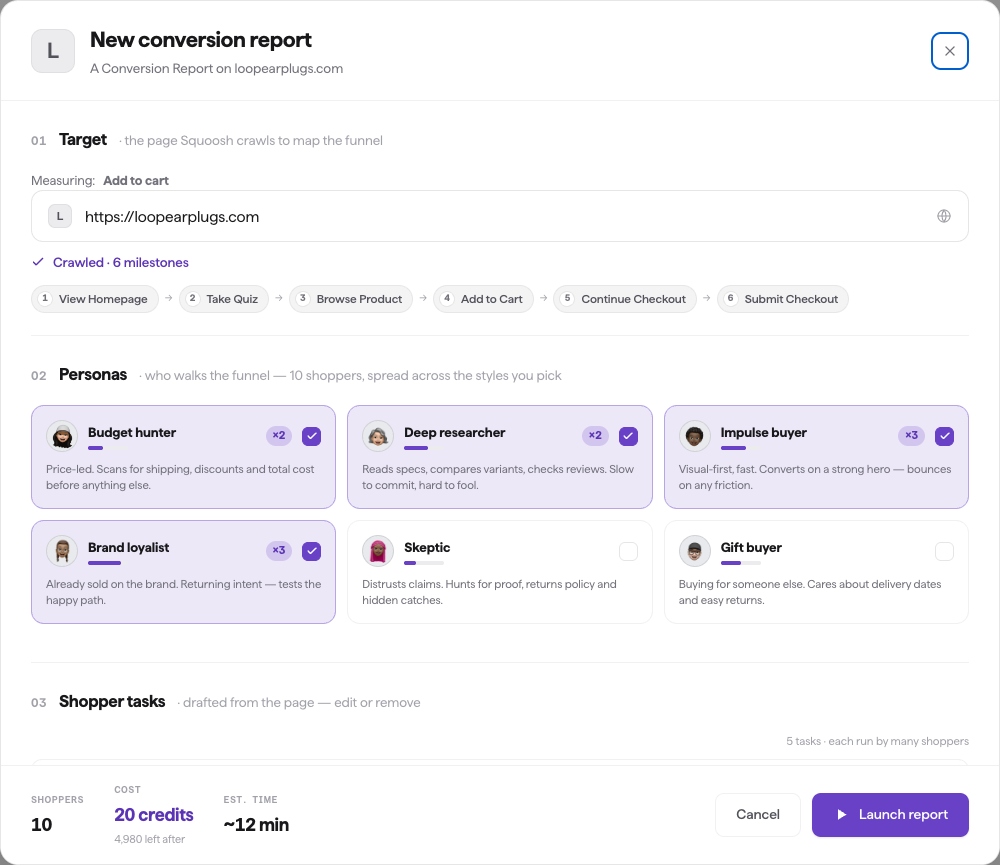
The builder crawls the funnel, then you pick the panel size and which shopping styles take part. This screenshot predates the Standard / Deep panel-size cards, and its footer figures are out of date — the live wizard's own footer is the price to trust.
Squoosh crawls the page, assembles the named panel, opens browser sessions, and walks the panel through the funnel. A forming-panel checklist runs while everything is getting ready. Results fill in as shoppers finish.
What it costs
A Conversion Report costs one credit per shopper in the panel: 10 credits for a Standard panel, 30 credits for a Deep panel. The wizard shows the exact cost before you launch and your balance afterward. A report counts toward your monthly test limit whichever size you pick.
If you don't have enough credits, the wizard says so. To top up credits, contact the Squoosh team at support@squoosh.ai.
When a report finishes
The report finishes once the panel has walked the funnel. There's no confidence bar to clear — a Conversion Report is a diagnostic, not a comparison.
What you get
When the report finishes, it opens to a funnel-leak readout: the step that loses the most shoppers, the funnel broken down step by step, how the leak differs across shopping style and device, ranked fixes, and verbatim quotes from the shoppers who left. See Read a Conversion Report for how to read each part.
From the finished report you can Re-run report to run the same report again on the same page.