
How you ship variants
You build version B; Squoosh tests your real change and never generates or edits the variant. It needs to know how to reach the version you built. In an A/B test, the Variant section asks How do you ship variants? and gives you three ways to answer. This page explains each one and which to use.
The three modes
| Mode | Use it when | What you provide |
|---|---|---|
| Two URLs | Each version lives at its own web address. | The Variant page (B) URL. |
| VWO / Optimizely / AB Tasty / Convert | A client-side testing tool shows the variant on a single URL. | Preview URLs, or the experiment and variation IDs. |
| Feature flag | Your server selects the version from a flag (LaunchDarkly, Statsig, Split, or custom). | The flag mechanism and its control and variant values. |
Two URLs is selected by default and is the simplest path. The vendor and feature-flag modes are verified for Convert, VWO, Optimizely and server-side flags; AB Tasty is still in beta — see Vendor and feature-flag modes below.
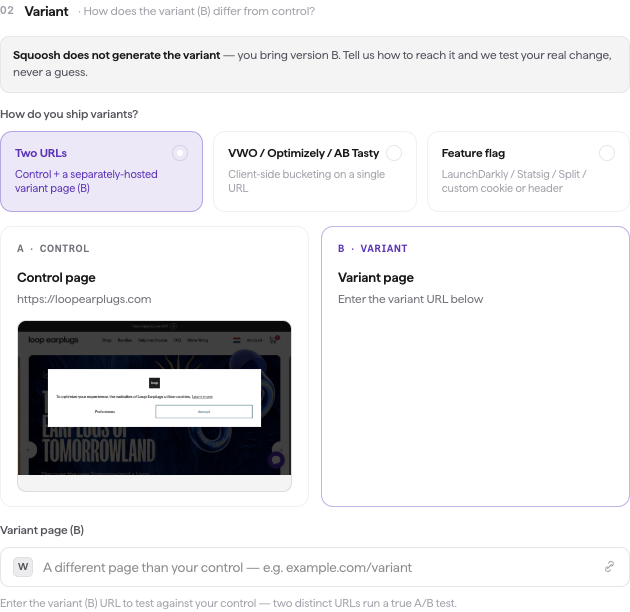
The Variant step, where you tell Squoosh how to reach version B.
Two URLs
Use Two URLs when your Control page (A) and Variant page (B) have separate web addresses. This is the verified setup and the one to use whenever you can host the variant at its own URL.
You entered the Control (A) URL earlier in the wizard. In the Variant section:
- Select Two URLs if it is not already selected.
- Enter the Variant page (B) URL.
The Variant (B) URL must be a valid address and must differ from the Control (A) URL. Two distinct URLs run a true A/B test, so Squoosh does not let you point the variant at the control. When the URL is valid and distinct, the wizard confirms it with Looks valid · differs from control.
Vendor and feature-flag modes
If your variant is served on the same URL as your control — by a client-side testing tool or a server-side flag — use one of the two modes below. With both versions on a single URL, you tell Squoosh how to reach each one. This is expected for these setups; only Two URLs needs two distinct addresses.
Note
Convert, VWO and Optimizely are verified: on a live campaign, Squoosh's pin put the requested version on the page for both arms and the arm check confirmed it from the tool's own runtime state, through both of Squoosh's browser paths. AB Tasty is in beta: its arm is pinned through AB Tasty's documented cookie mechanism and checked against AB Tasty's own runtime decision, but that pin has not yet been reproduced on a live campaign. A shopper whose arm the tool contradicts is excluded from the result; a shopper whose arm cannot be checked at all is marked unverified and Squoosh's page read decides — so a misconfigured run normally reports "No change" or "Insufficient data" rather than a winner, but an unverifiable arm is a gap, not a guarantee. If you use AB Tasty, contact support@squoosh.ai and we will validate it with you. Use Two URLs for any test where you can host the variant at its own address.
VWO / Optimizely / AB Tasty / Convert
Use this mode when a client-side tool shows different visitors a different version on one URL.
- Select VWO / Optimizely / AB Tasty / Convert.
- Choose your Vendor: VWO, Optimizely, AB Tasty, or Convert.
- Tell Squoosh how to reach each version. The wizard offers two ways, but which one your vendor supports differs:
- Preview URLs — VWO and Convert only. Enter the Control (A) preview URL and the Variant (B) preview URL. Both must be on the same site as the page under test (a preview link on another domain cannot pin anything there and is refused), both must come from the tool's own Preview feature (a link that carries none of the tool's preview parameters is refused rather than guessed at), and both should come from the same experiment.
- Experiment + variation IDs — enter the Experiment ID, the Variation ID for Control (A), and the Variation ID for Variant (B). This works for every vendor, and it is the only setup Optimizely and AB Tasty accept — neither has a preview-link mechanism Squoosh can pin an arm with, so a preview-URL setup for either is refused when you launch. For those two vendors the wizard opens directly on the ID fields, so there is no strategy switch to make. Convert's ids are numeric.
- VWO numbers variations per campaign: control is
1, the first variation2, and so on. IDs are the verified VWO setup; preview links are accepted but not yet validated end to end. - Optimizely needs force parameters enabled in your project (Settings → Implementation → Privacy: leave Disable the force variation parameter unchecked). Without it Optimizely silently ignores the pin and both arms show the bucketed variation. Verified on published Web A/B experiments; for a draft or paused experiment switch on Draft or paused experiment in the wizard and allow anyone to view draft or paused experiments in the project. Optimizely does not record forced visitors, so runs never write into your results.
- AB Tasty is pinned through the
ABTastycookie's campaign-history entry (the original is variation0). Accounts that store visitor data in localStorage cannot be pinned this way, and a consent wall that delays the tag can leave an arm unverified.
- VWO numbers variations per campaign: control is
When a vendor mode runs, Squoosh lets that vendor's script load in every shopper's browser (it stays blocked otherwise, so your live test data isn't polluted), pins each shopper to its version for the whole visit, and checks on the first page that the vendor actually served the version it was asked for — reading the vendor's own runtime decision (VWO's chosen combination, Optimizely's active experiment states, AB Tasty's tests on page, Convert's experience cookies), never a guess from the page's look.
If you paste your tool's preview links straight into Two URLs instead — for example Convert preview links carrying convert_action=convert_vpreview — Squoosh recognizes them and runs the matching vendor setup automatically, as long as both the control and the variant are preview links from the same tool. A preview link on one side and a plain page on the other is not recognized (the plain side could not be pinned to one version), so the test runs as an ordinary Two-URLs test and Squoosh warns if it cannot tell the arms apart. If a testing platform is switched on for the property (Settings → Analytics), an unrecognized pair is refused at launch instead — and a recognized pair excuses only the platform it pins: any other platform that is switched on still has to be turned off before the test can launch.
Feature flag
Use this mode when your server picks the version from a flag value.
- Select Feature flag.
- Choose your Vendor if you use one: LaunchDarkly, Statsig, or Split. Leave it on Custom / none for any other flag.
- Choose how your server reads the flag: a Cookie, a Header, or a Query param, and name it.
- Enter the Control (A) value and the Variant (B) value — the flag values that select each version.
- Recommended: enter a marker for each arm — a CSS selector (for example
[data-variant="b"]) that exists on the page only when that arm is served. Both markers are needed; this is the only way Squoosh can prove your server honoured the flag. Without them, a cookie or query override is confirmed as sent but not as honoured (shoppers are marked unverified, not excluded), a header override cannot be checked at all, and Squoosh relies on its no-difference check, reporting No change if both arms rendered the same page.
What this mode does and does not do:
- Your server does the work. Choosing LaunchDarkly, Statsig or Split labels the test; it does not connect that vendor's SDK. Squoosh sets the exact cookie, header or query parameter you name, with the value you give, and your application must turn that value into the served version.
- Persistence differs by channel. A cookie is scoped to your domain and path and follows the shopper through the visit; a header accompanies every request the shopper's browser makes for the whole visit (so use a non-secret testing value); a query parameter is added to the entry URL only — your application must carry it onto its own links, or the pin is lost on the first click.
- Render the markers from the same decision that picks the version, so they cannot merely echo the incoming value.
- A no-difference result is not a safety net. If both arms rendered the same page Squoosh says so, but an unverified arm is a gap in the evidence, not proof that nothing went wrong.
Verified 2026-09-06 through all three channels against a server-rendered fixture, through both of Squoosh's browser paths, with markers on both arms.
If Squoosh detects your testing tool
When you enter a control URL that Squoosh recognizes as running a client-side testing tool, it switches to the matching vendor mode for you and shows a banner naming the tool. To go back, choose Two URLs in the banner or pick a mode yourself.
If Squoosh can't tell the versions apart
After a run, Squoosh checks that the two versions it captured differ from each other. If they look identical, it shows a warning above the verdict instead of reporting a result you can't trust. This usually means the variant didn't apply during the run — most often because a same-URL tool showed both versions the same page. Recheck the preview URLs, IDs, or flag values you entered for the variant, then run the experiment again.